Archaeology
Find an unclaimed ruin, confirm it from soil samples, establish a field camp, excavate by sound, and preserve each find for study or display.
Last modified:
Prepare the equipment
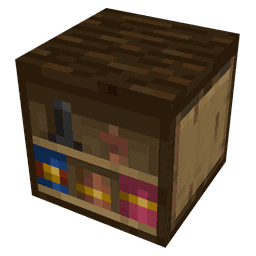
Make the Archeology Table at a Crafting Table. This workshop is where you make all archaeology tools, including the tracker, prospecting kit, establishment kit, excavation tools, brush, field pencil, and cabinet.
Archeology Table
Crafting Table



1. Find a ruin
Hold the tracker and follow its pulses. They get faster as you approach a ruin that nobody has claimed. If the beeps fade, turn back and try another direction. The tracker stays quiet for a ruin where you already planted a camp. When you are close enough, chat tells you to prospect the ground.
2. Confirm it
Use the prospecting kit on shovel-dug earth: dirt, grass, sand, gravel, clay, or mud. Stone and furniture do not count. Hold still while taking each sample; walking away cancels it. Spread samples out and follow the traces until chat confirms the site. Confirmation alone does not claim the ruin.
3. Plant the camp
After confirmation, hold the establishment kit and aim at a neighboring chunk rather than the ruin itself. Turn until the camp ghost sits cleanly, then confirm. You become the director, and the tracker will no longer pulse for this ruin. The tents sit beside the dig; the prism marks the ruin ground and the layers below it. Establishing camp does not spend the work day.
Use the camp board to read the dossier, manage who may work, review the finds list, and choose Show limits. The glowing cut boundary appears only to you and only briefly. If you have reached your camp limit, close an old camp before claiming another.
4. Dig: hear, then release
Inside the dig site, hold left-click with an excavation tool. The block does not crack like ordinary mining. Listen to the cue, then release the button.
| Cue | Meaning |
|---|---|
| Soft clings, then a louder ready chime | Empty fill. Release on the ready chime to lift cubes. |
| Release too soon | Nothing leaves. The next hold starts clean. |
| Release too late | More cubes leave, giving you less control. |
The HUD names the stratum and may show how many cuts remain today. Light tools make narrow shafts; heavier tools take wider bites, and a late release always removes more than a timely one. Empty fill can reveal traces of material still touching the hole, which tells you when to slow down.
A buried find can be destroyed
5. Brush the find out
A find is a shape inside the dirt, not a loot block. Expose the shape carefully. When every remaining cube has air on at least one face, those cubes begin dripping. Hold right-click with the brush while aiming at a dripping cube. Looking away pauses that cube; looking back continues it. Keep brushing until one recovered item comes free. A pick never drops the item, and a completely destroyed find drops nothing.
The item label tells you whether it is intact, worn, crumbling, or somewhere between. Its starting condition was decided in the ground; careful excavation can preserve it, but cannot turn a naturally damaged piece into a pristine one.
6. Clean, sketch, register
Take the recovered piece to the cabinet and right-click while holding it. Sneak if you only want the block's ordinary Minecraft use. A dirty piece opens the lab, where each stain names the tool that removes it. A cleaned piece without a drawing can be registered, and an already filed piece opens its reading. Empty-handed clicks do not open the cabinet workflow.
To make the drawing, click a field sheet onto the pencil in your inventory, or hold the sheet and use the pencil in your other hand. Sign the sketch, then return to the cabinet and register it with the find in hand.
7. Museum
Build any room you like. Shift-right-click a recovered find on a frame, lectern, shelf, armor stand, or a case that accepts plaques to open the same reading available from the camp board. Clicking without Shift keeps the ordinary Minecraft action, such as hanging, rotating, or taking an item. Empty supports and unrelated items do nothing extra.
8. When the site is finished
Once every find has been recovered or destroyed, the excavation is exhausted. Close the camp from the board to leave the site and free room for another ruin. You receive a field book; right-click it later to reopen the excavation dossier and finds record even after the tents are gone.